Colors
Prefer videos? Check out our YouTube playlist for video guides on how to use the plugin.
Colors changes which colors are available for use in ELS patterns. You can add more colors, change the built-in colors, and delete custom colors.
Colors#
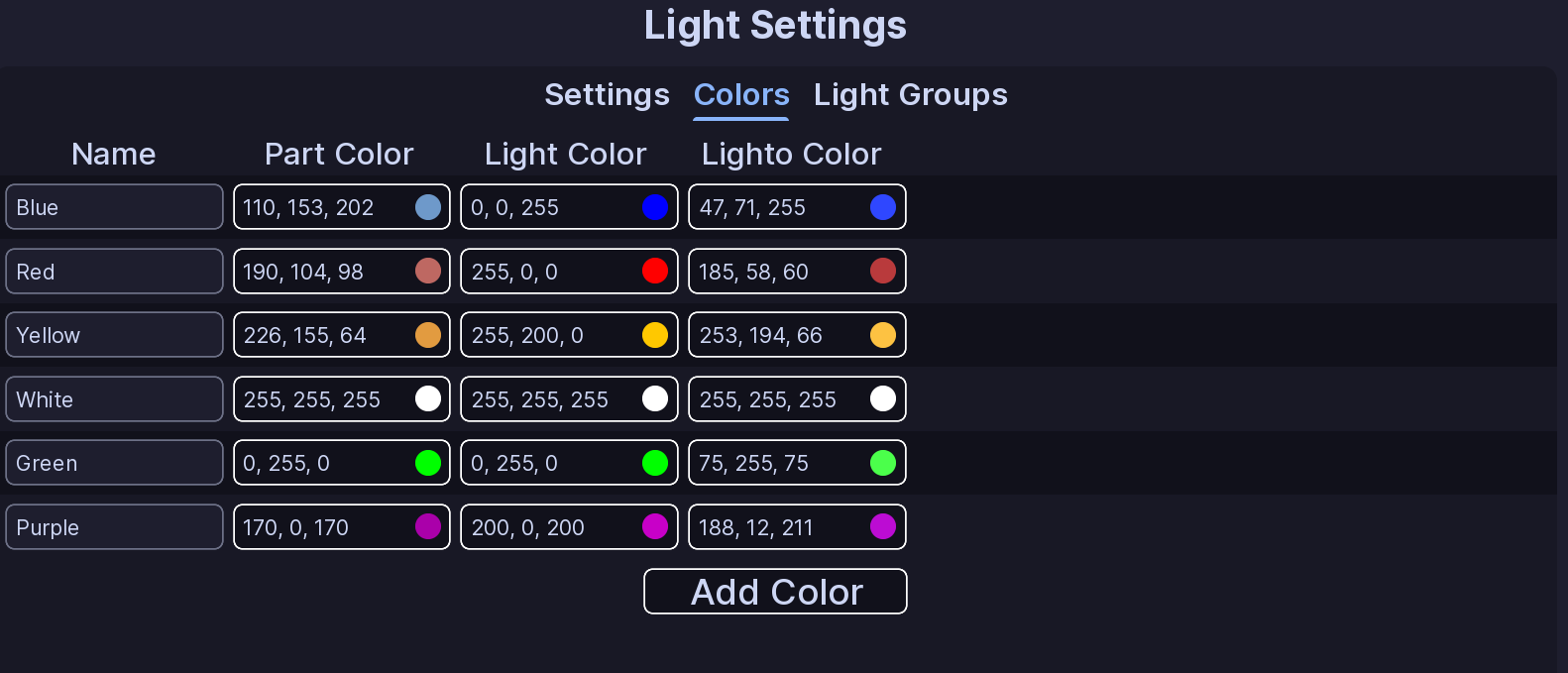
Each color has:
- Name: This is the name of the color that will show in EVCs UI.
- Part Color: This is the color that will be used for neon lights.
- Light Color: This is the color that will be used for light emitters.
- Lighto Color: This is the color that will be used for lightos.
The six built-in colors cannot be renamed or deleted.
Click Add Color to create your own color. Custom colors can be renamed, edited, and deleted.
Danger
If you delete a custom color, EVC also removes it from any flashers, faders, or rotators that were using it.
All Done!#
Your colors, effects, and light groups are ready to use in ELS patterns.
Here are some recommended next steps to help you get started:
- Light Groups: Learn how to create powerful light groups.
- Siren Setup: Learn how to setup and configure sirens.
- Function Setup: Learn how functions organize patterns and activations.
If you encounter any issues or have questions, feel free to contact us on Discord.