Rotators#
Prefer videos? Check out our YouTube playlist for video guides on how to use the plugin.
Rotators move a light through different angles.
A rotator section controls one light and contains a list of steps.
Create a rotator#
- Open a pattern.
- Open Rotators.
- Click Add Section.
- Enter the light name you want to control.
Step types#
Rotators also have three types of steps:
Angle#
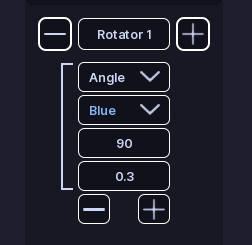
An Angle step moves the light to the angle specified in Angle. The angle is in degrees, and 0 is the default angle of the light.
It also uses:
- Color: The color while the step is active. This is set as soon as the step starts.
- Velocity: The speed at which the light rotates to the target angle. A higher number means a faster rotation. Read more below about how velocity works.
Infinite#
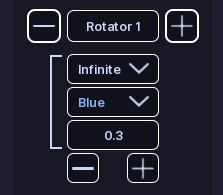
An Infinite step keeps the light rotating forever. Any steps after an Infinite step will never be reached.
It uses:
- Color: The color while the step is active. This is set as soon as the step starts.
- Velocity: The speed at which the light rotates. A higher number means a faster rotation. Read more below about how velocity works.
Wait#
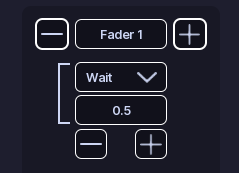
A Wait step does not change the rotation.
It waits for the amount of time entered in Time, then moves to the next step.
Preview#
Preview works exactly like Flashers. Except it steps through the fader steps instead of flashing lights.
Edit steps#
Adding or removing steps is done with the + and - buttons on the bottom of the step list.
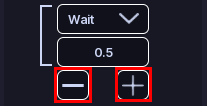
When you change a step type, settings that do not apply to the new type are removed.
All Done!#
You have created a rotating pattern for your vehicle.
Here are some recommended next steps to help you get started:
- Siren Setup: Learn how to set up and configure sirens.
- Function Setup: Learn how functions organize patterns and activations.
- Customize Activations: Learn how to customize a functions activations.
If you encounter any issues or have questions, feel free to contact us on Discord.