Siren Setup#
Prefer videos? Check out our YouTube playlist for video guides on how to use the plugin.
Documentation is a Work in Progress
This documentation is a work in progress and may be missing information or contain errors. If you need help please contact us on our Discord server!
If you know about this topic and want to help us, please consider contributing to this page on GitHub.
The Sirens page lets you set up the sounds used by your vehicle.
Add a siren#
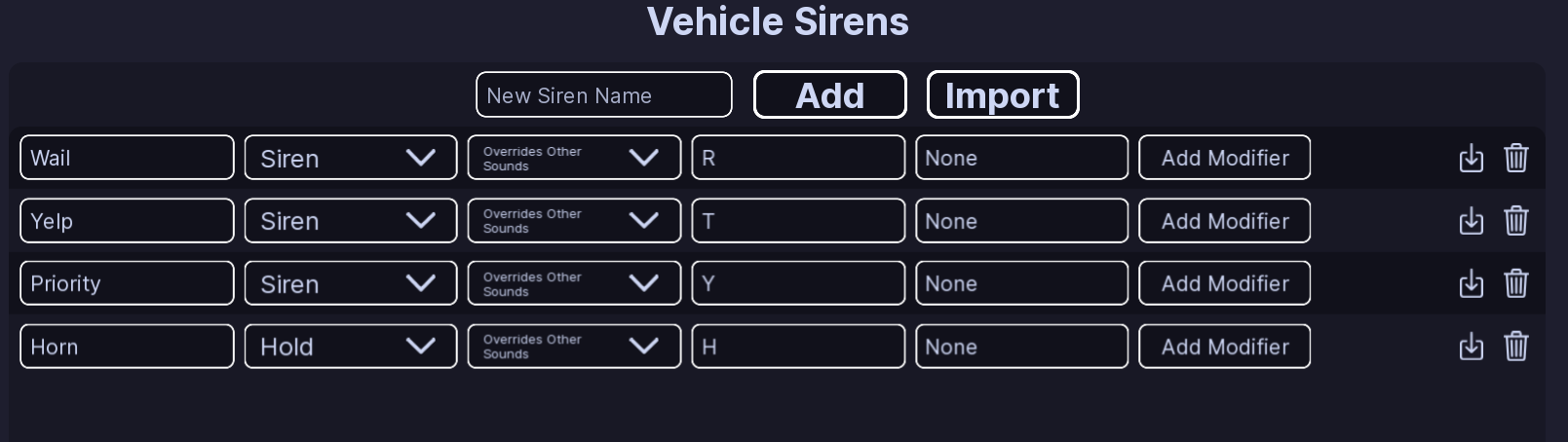
- Enter a name in New Siren Name.
- Click Add.
If you leave the name empty, EVC uses Wail. If the name is already being used, EVC gives the new siren a unique name.
Each siren has a type:
- Siren — a normal siren that can be turned on and off.
- Hold — plays while its keybind is held.
- Modifier — changes how another siren behaves.
Siren behavior#
Normal and Hold sirens have two options:
- Overrides Other Sounds — the siren takes control over other sounds.
- Plays Simultaneously — the siren can play at the same time as other sounds.
You can give a siren one or more keybinds.
Default sirens#
| Siren | Type | Key |
|---|---|---|
| Wail | Siren | R |
| Yelp | Siren | T |
| Priority | Siren | Y |
| Horn | Hold | H |
The default setup also has controller keybind slots. An Unknown key means no controller key is assigned.
Siren modifiers#
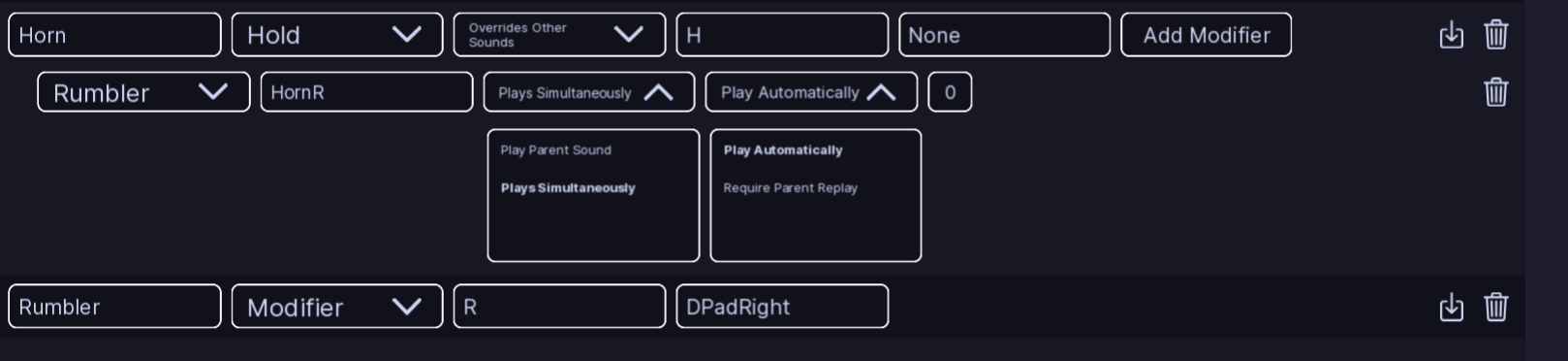
You can add a modifier to a Siren or Hold siren with Add Modifier.
A modifier lets you use another sound and choose what happens to the original siren.
Its settings include:
- Siren — which modifier sound to use.
- Modified Siren Name — the sound that will play.
- Play Parent Sound / Plays Simultaneously — whether the original siren keeps playing.
- Play Automatically / Require Parent Replay — when the modified sound starts.
- Delay — how long to wait before it starts.
Delete a siren or modifier#
Use the delete control next to the item you want to remove.
EVC asks you to confirm before deleting it.
Note
If you rename a siren, check any settings that use that siren's name.
All Done!#
Your vehicle now has its sirens, keybinds, and modifiers configured.
Here are some recommended next steps to help you get started:
- Function Setup: Learn how to set up functions to create ELS.
- Light Settings: Learn how to configure the lights used by your vehicle.
- Flashers: Learn how to create a basic light pattern.
If you encounter any issues or have questions, feel free to contact us on Discord.